
Download Calligrapher Pro APK – calligraphy app, digital calligraphy tool, calligraphic design software, Android art app, pen drawing app, creative writing tool, digital sketching app, artistic drawing software, hand lettering app, calligraphy tool for Android
Overview
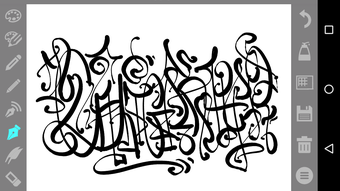
Calligrapher Pro is a dedicated digital calligraphy application designed for Android devices, offering users a refined platform for creating expressive calligraphic prints and hand-drawn artwork. Developed by Mark Tushkevich, the software caters to both amateur artists and professionals seeking a precise, intuitive tool for digital pen-based drawing. Its core purpose lies in simulating traditional calligraphy techniques through digital means, enabling users to craft elegant lettering, artistic sketches, and decorative designs with a high degree of control. The app is particularly suited for calligraphy enthusiasts, graphic designers, and digital illustrators who require a lightweight yet feature-rich tool for on-the-go creativity. It supports both portrait and landscape orientations, enhancing usability across different device setups. Real-world applications include journaling, logo sketching, wedding invitation design, and personal artistic expression. The Pro version removes advertisements, ensuring a distraction-free environment for focused creative work. While the developer did not provide additional system requirements, the application is designed for modern Android devices with touch-screen capabilities.
Key Features & Capabilities
- Five Customizable Pen Types: Includes a constant-thickness pen, a speed-sensitive pen, a directional-thickness pencil, a wide pencil, and a dual-line pen. Each tool offers unique artistic effects based on movement dynamics.
- Adjustable Line Settings: Users can modify color, line thickness, and transparency for all pens, allowing for fine-tuned visual outcomes.
- Slope and Direction Control: The wide pencil supports angle adjustments from 0 to 90 degrees, while the thin pencil offers up to 360-degree directional sensitivity for intricate detailing.
- Zoom and Background Options: Built-in zoom functionality enhances precision, and a gradient background feature supports visual contrast and composition planning.
- Ad-Free Experience: The Pro version eliminates ads, ensuring uninterrupted creative flow during drawing sessions.
- Advanced Drawing Controls: Includes options to disable anti-aliasing, beneficial for pixel-art-style calligraphy and crisp line rendering.
- Export and Save Functionality: Drawings can be saved for further editing or sharing, making it suitable for professional workflows.
These features collectively empower users to emulate traditional calligraphy with digital precision. For example, a designer might use the directional-thickness pencil to create dynamic strokes in hand-lettered headlines, while a hobbyist could experiment with gradient backgrounds to visualize compositions before finalizing artwork. The ability to disable anti-aliasing also makes the app viable for pixel-based artistic projects, expanding its creative scope beyond standard calligraphy.
User Interface, Workflow & Performance
Calligrapher Pro features a streamlined, user-friendly interface with tools displayed on a transparent toolbar, minimizing screen obstruction during drawing. This layout prioritizes visual clarity and ease of access, allowing users to switch between pen types and settings without disrupting their workflow. Navigation is intuitive, relying on touch-based gestures and direct tool selection. The app supports automatic screen orientation changes, adapting seamlessly between portrait and landscape modes based on device positioning. This enhances usability across various devices and use cases, such as sketching on tablets or working on smartphones. Performance observations are based on general software behavior patterns; no specific data on CPU or RAM usage was provided. The developer did not specify resource usage details. Stability is expected to be consistent with typical Android applications of similar scope, though real-world performance may vary depending on device hardware and system conditions.
Compatibility & System Requirements
Calligrapher Pro is designed for Android operating systems and is available as a downloadable APK file. The current version is 1.0.1, with a file size of 24.7 MB, indicating a lightweight installation. While the developer did not specify exact system requirements, the application is intended for devices with touch-screen capabilities and standard Android functionality. Compatibility information was partially provided, and no details were given about minimum processor speed, RAM, or storage space needed. Users should ensure their device meets general Android compatibility standards for third-party apps. The app is available for download on the Google Play Store, suggesting it meets platform security and performance guidelines. For optimal performance, it is recommended to use the app on devices running recent Android versions.
Pros and Cons
Pros
- Ad-free experience in the Pro version
- Five distinct pen types with unique behaviors
- Highly customizable line settings including color, thickness, and transparency
- Support for automatic screen orientation changes
- Ability to disable anti-aliasing for pixel-perfect results
- Lightweight file size (24.7 MB)
- Zoom and gradient background options for enhanced creativity
Cons
- No information provided on minimum system requirements
- Performance data not specified by the developer
- Only available for Android devices
- Price point may be considered high for casual users
- Limited to digital drawing—no advanced editing or layer support mentioned
FAQ Section
Is Calligrapher Pro compatible with all Android devices?
Calligrapher Pro is designed for Android devices with touch-screen functionality. While the developer did not specify exact compatibility details, the app is available on the Google Play Store, indicating it meets standard Android platform requirements.
Is the app safe to download and use?
As the app is available on the Google Play Store and developed by Mark Tushkevich, it is distributed through a secure platform. No security risks were reported, and the app does not require root access.
Can I use Calligrapher Pro offline?
Yes, the application does not require an internet connection to function. All drawing and editing features are available offline after installation.
What kind of license does Calligrapher Pro use?
Calligrapher Pro is a one-time purchase app with a fixed price of $4.99. It does not operate on a subscription model, and no licensing details were provided beyond the purchase price.
How often are updates released for Calligrapher Pro?
Update frequency is not specified by the developer. The current version is 1.0.1, released on June 15, 2024. Users are encouraged to check the Google Play Store for new releases.
Final Thoughts + CTA
Calligrapher Pro stands out as a focused, well-crafted digital calligraphy tool tailored for Android users who value precision and creative freedom. With its diverse pen types, customizable settings, and ad-free interface, it delivers a professional-grade experience on mobile devices. The inclusion of features like anti-aliasing control, zoom, and orientation flexibility enhances usability across different creative tasks. While the lack of detailed system requirements and performance metrics limits deeper technical evaluation, the app’s lightweight footprint and intuitive design make it accessible to a broad audience. It is particularly beneficial for calligraphy artists, graphic designers, and hobbyists seeking a reliable digital sketching companion. For those invested in digital hand-lettering and artistic expression, Calligrapher Pro offers a compelling solution. Download Calligrapher Pro now.




.png)


